IAM (Identity and Access Management)
MolnOS IAM provides comprehensive identity and access management with support for users, service accounts, and fine-grained role-based access control (RBAC). Manage who can access what resources and what actions they can perform.
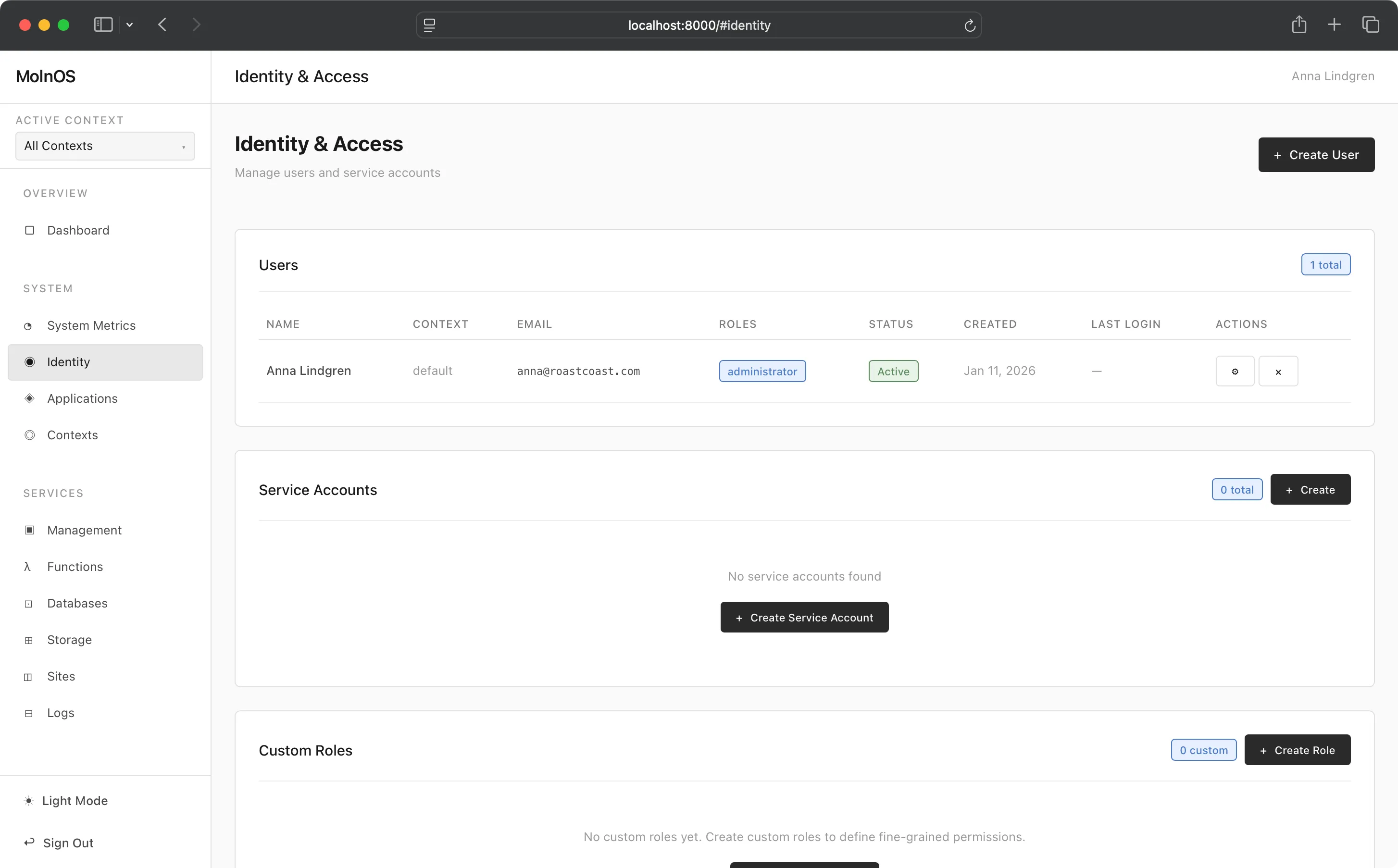
Features
Section titled “Features”User Management
Section titled “User Management”Create and manage user identities with flexible authentication options. Users can sign in via magic links or OAuth providers (Google, GitHub, Microsoft), and administrators can manage user properties, roles, and metadata.
Service Accounts
Section titled “Service Accounts”Create machine-to-machine service accounts with API keys for automated access. Service accounts enable secure, programmatic access to MolnOS services without user credentials.
Role-Based Access Control (RBAC)
Section titled “Role-Based Access Control (RBAC)”Assign roles to users and service accounts. Roles define collections of permissions that determine what actions an identity can perform.
Custom Roles
Section titled “Custom Roles”Create custom roles with specific permission sets tailored to your organization’s needs. Define granular permissions for each service and resource type.
Fine-Grained Permissions
Section titled “Fine-Grained Permissions”Permissions follow the pattern service.resource.action:target with wildcard support:
databases.table.read- Read access to all database tablesstorage.bucket.write:my-bucket- Write access to specific bucketidentity.*- All identity operations
Role Constraints
Section titled “Role Constraints”Configure who can assume roles with constraint policies:
- Specify which identities, roles, or services can assume a role
- Set maximum assumption duration
- Require justification for role assumption
- Define audit levels for compliance
Built-in Roles
Section titled “Built-in Roles”Two built-in roles provide standard permission sets:
administrator- Full access to all resourcesuser- Standard user access with limited permissions
Common Use Cases
Section titled “Common Use Cases”- User Onboarding: Create user accounts and assign appropriate roles
- Team Management: Organize users into roles based on job function
- Service Integration: Create service accounts for CI/CD, monitoring, and automation
- Least Privilege Access: Grant minimum necessary permissions with custom roles
- Compliance: Track and audit access with role constraints and audit levels
- Multi-Tenant Systems: Isolate tenant access with resource-specific permissions
- Temporary Access: Grant time-limited access with role assumption constraints
How It Works
Section titled “How It Works”Console
Section titled “Console”The Console allows you full abilities to create users, service accounts, and custom roles.
Custom roles are powerful and useful ways to define what permissions some archetype might have.
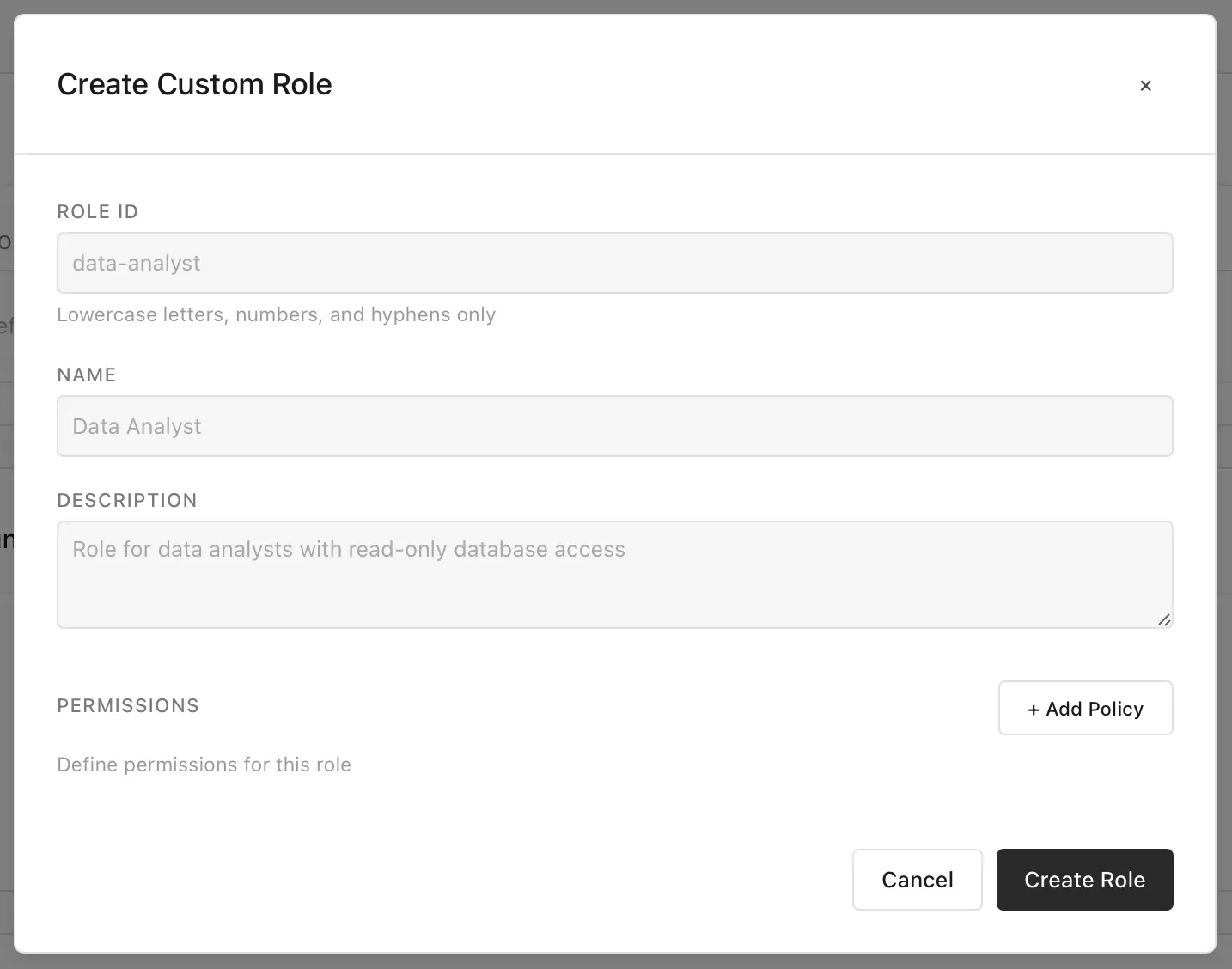
Adding permissions is a key part of role definition—these can be added across all services and areas of MolnOS, making fine-grained control tangible and easy.
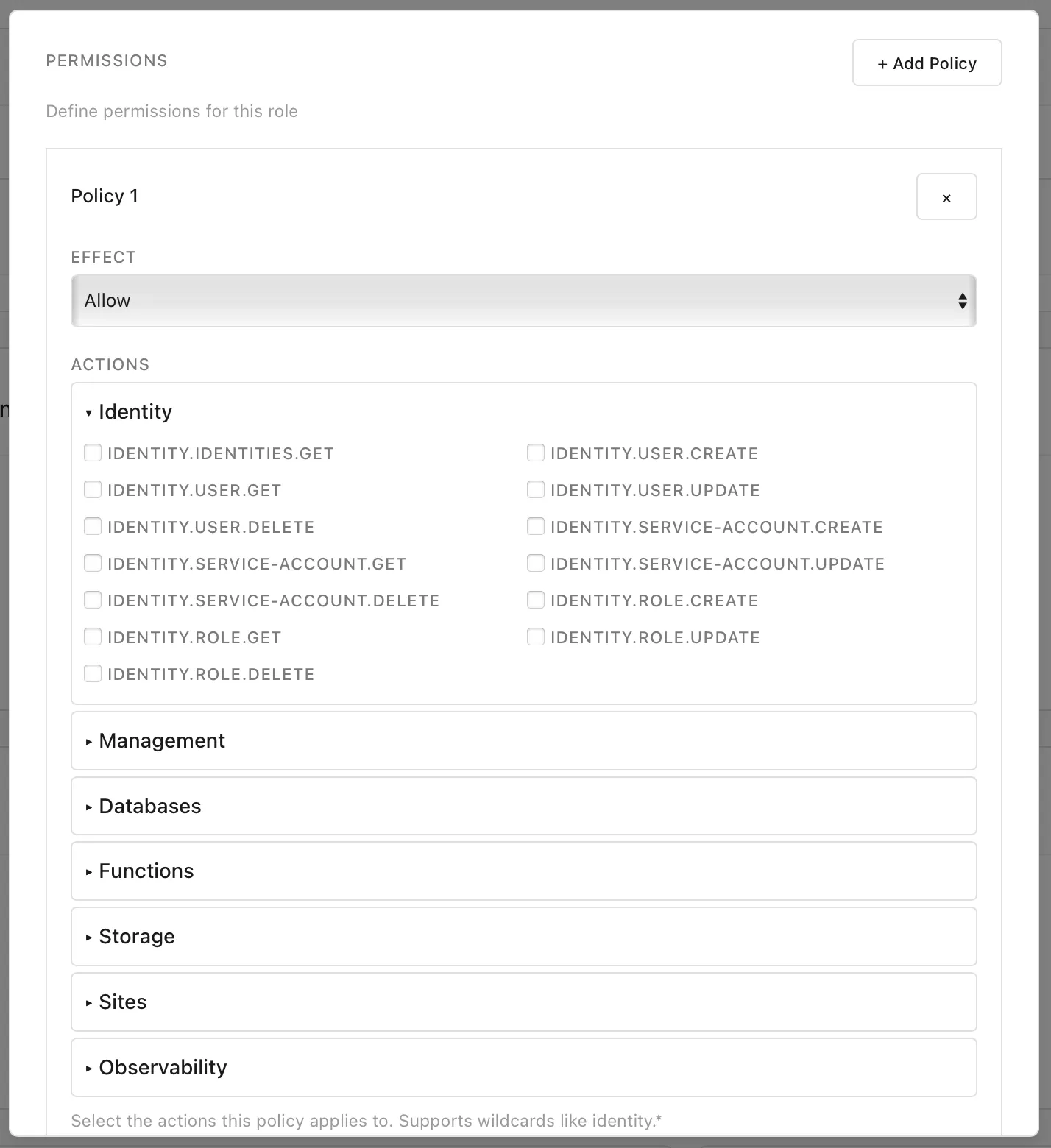
These roles, when created, can be added to new or existing users and service accounts.
IAM is managed through the HTTP API at /identity/* endpoints.
Get Current Identity
Section titled “Get Current Identity”GET /identity/whoamiReturns details about the currently authenticated identity (user or service account) including role IDs.
Authentication
Section titled “Authentication”OAuth Authentication
Section titled “OAuth Authentication”MolnOS supports OAuth authentication with multiple providers. Users can authenticate using their existing accounts from Google, GitHub, Microsoft, and other configured providers.
List OAuth Providers
Section titled “List OAuth Providers”GET /auth/oauth/providersReturns a list of configured OAuth providers available for authentication.
Initiate OAuth Flow
Section titled “Initiate OAuth Flow”GET /auth/oauth/{providerId}Initiates OAuth authentication with the specified provider (e.g., google, github, microsoft). Redirects the user to the OAuth provider’s authorization page.
For external applications, provide optional query parameters:
redirect_uri- The URL to redirect to after authentication (must be registered)application_id- The application ID of the registered application
Example:
GET /auth/oauth/google?redirect_uri=https://myapp.example.com/auth/callback&application_id=01234567-89ab-cdef-0123-456789abcdefOAuth Callback Handler
Section titled “OAuth Callback Handler”GET /auth/oauth/{providerId}/callbackHandles the OAuth provider’s callback after user authorization. This endpoint validates the authorization code, exchanges it for tokens, and creates a MolnOS session.
If the login was initiated with redirect parameters, it automatically redirects to the application’s redirect URL with tokens as query parameters. Otherwise, it returns tokens as JSON.
Query parameters:
code- Authorization code from OAuth provider (required)state- CSRF protection state token (required)error- Error code from OAuth provider (if authorization failed)error_description- Error description from OAuth provider
Response (when no redirect is configured):
{ "success": true, "accessToken": "...", "refreshToken": "...", "expiresIn": 3600, "userId": "usr_abc123"}Magic Link Authentication
Section titled “Magic Link Authentication”Users can also authenticate via email-based magic links. Check the Authentication API documentation for magic link endpoints.
List All Identities
Section titled “List All Identities”GET /identity/identitiesReturns all users and service accounts in the system.
Create User
Section titled “Create User”POST /identity/usersCreate a new user:
{ "name": "Jane Doe", "roles": ["user"], "verified": true}List Users
Section titled “List Users”GET /identity/usersReturns all user identities.
Get User
Section titled “Get User”GET /identity/users/{userId}Returns a specific user including role IDs.
Update User
Section titled “Update User”PATCH /identity/users/{userId}Update user properties:
{ "name": "Jane Smith", "roles": ["user", "data-analyst"], "metadata": { "department": "Engineering", "title": "Senior Developer" }}Delete User
Section titled “Delete User”DELETE /identity/users/{userId}Deletes a user identity.
Service Accounts
Section titled “Service Accounts”Create Service Account
Section titled “Create Service Account”POST /identity/service-accountsCreate a service account with API key:
{ "name": "ci-pipeline", "description": "CI/CD pipeline automation", "roles": ["deployer"]}Response includes the API key (shown only once):
{ "id": "sa_abc123", "name": "ci-pipeline", "apiKey": "sa.abc123.def456789", "roles": ["deployer"]}List Service Accounts
Section titled “List Service Accounts”GET /identity/service-accountsReturns all service accounts (API keys excluded).
Get Service Account
Section titled “Get Service Account”GET /identity/service-accounts/{serviceAccountId}Returns a specific service account.
Update Service Account
Section titled “Update Service Account”PATCH /identity/service-accounts/{serviceAccountId}Update service account properties:
{ "name": "updated-name", "description": "Updated description", "roles": ["deployer", "reader"]}Delete Service Account
Section titled “Delete Service Account”DELETE /identity/service-accounts/{serviceAccountId}Deletes a service account and revokes its API key.
Rotate Service Account Key
Section titled “Rotate Service Account Key”POST /identity/service-accounts/{serviceAccountId}/rotate-keyGenerates a new API key for a service account (invalidates the old key).
List Roles
Section titled “List Roles”GET /identity/rolesReturns all roles (built-in and custom).
Get Role
Section titled “Get Role”GET /identity/roles/{roleId}Returns a specific role with full policy details.
Create Custom Role
Section titled “Create Custom Role”POST /identity/rolesCreate a custom role:
{ "roleId": "data-analyst", "name": "Data Analyst", "description": "Read-only access to databases and observability", "permissions": [ "databases.table.read", "databases.table.get", "observability.read" ], "constraints": { "assumable_by": { "roles": ["administrator"] }, "assumption_constraints": { "max_duration": 3600, "require_reason": true, "audit_level": "high" } }}Update Role
Section titled “Update Role”PATCH /identity/roles/{roleId}Update role properties:
{ "permissions": [ "databases.table.read", "databases.table.get", "observability.read", "observability.write" ]}Delete Role
Section titled “Delete Role”DELETE /identity/roles/{roleId}Deletes a custom role (built-in roles cannot be deleted).
IAM operations using the MolnOS CLI:
# Get current identity (whoami)molnos whoami
# List all identities (users + service accounts)molnos identities
# User managementmolnos users listmolnos users get <user-id>molnos users update <user-id> '{"name":"New Name","roles":["user","admin"]}'molnos users delete <user-id>
# Service account managementmolnos service-accounts listmolnos service-accounts create ci-pipeline "CI/CD pipeline" deployermolnos service-accounts get <service-account-id>molnos service-accounts update <service-account-id> '{"name":"New Name","roles":["deployer"]}'molnos service-accounts rotate-key <service-account-id>molnos service-accounts delete <service-account-id>
# Note: To assign multiple roles, update the identity after creation:# molnos users update <user-id> '{"roles":["user","administrator"]}'
# Role managementmolnos roles listmolnos roles get administratormolnos roles create '{"roleId":"data-analyst","name":"Data Analyst","description":"Read-only database access","permissions":["databases.read","observability.read"]}'molnos roles update data-analyst '{"permissions":["databases.read","databases.write"]}'molnos roles delete data-analystPermissions
Section titled “Permissions”IAM operations require appropriate permissions:
User Permissions
Section titled “User Permissions”identity.user.create- Create new usersidentity.user.get- View and list user detailsidentity.user.update- Update user propertiesidentity.user.delete- Delete users
Service Account Permissions
Section titled “Service Account Permissions”identity.service-account.create- Create service accountsidentity.service-account.get- View and list service account detailsidentity.service-account.update- Update service accounts (also used for key rotation)identity.service-account.delete- Delete service accounts
Role Permissions
Section titled “Role Permissions”identity.role.create- Create custom rolesidentity.role.get- View and list role detailsidentity.role.update- Update rolesidentity.role.delete- Delete custom rolesidentity.identities.get- List all identities (users and service accounts)
Best Practices
Section titled “Best Practices”Principle of Least Privilege
Section titled “Principle of Least Privilege”Grant users and service accounts the minimum permissions needed to perform their tasks. Start with restrictive permissions and expand as needed.
Use Custom Roles
Section titled “Use Custom Roles”Create custom roles for specific job functions rather than granting broad administrator access:
{ "roleId": "function-deployer", "name": "Function Deployer", "permissions": [ "functions.create", "functions.update", "functions.read", "functions.delete" ]}Service Account Security
Section titled “Service Account Security”- Store API keys securely (environment variables, secret managers)
- Rotate keys regularly using the rotate-key endpoint
- Use descriptive names to track service account purposes
- Delete unused service accounts promptly
Role Constraints
Section titled “Role Constraints”Use role constraints to enforce governance:
{ "constraints": { "assumable_by": { "roles": ["administrator"], "require_reason": true }, "assumption_constraints": { "max_duration": 7200, "audit_level": "high" } }}Regular Audits
Section titled “Regular Audits”- Review user and service account lists periodically
- Check role assignments for dormant accounts
- Audit permission grants for over-privileged identities
- Monitor assumption logs for unusual patterns