Sites
MolnOS Sites provides a simple static site hosting platform for deploying HTML, CSS, JavaScript, and other static files. Deploy complete web applications, documentation sites, portfolios, or landing pages without managing web servers.
Features
Section titled “Features”Static Site Deployment
Section titled “Static Site Deployment”Upload and deploy complete static websites with multiple files with atomic deployments. Deploy single-page applications, multi-page sites, or any collection of static assets.
Project Management
Section titled “Project Management”Each deployment creates a unique project with an 8-character hexadecimal project ID (e.g., a1b2c3d4). Project IDs are automatically generated if not provided. Projects are isolated from each other and can be managed independently.
Public Access
Section titled “Public Access”Deployed sites are publicly accessible without authentication. Anyone can view your deployed files by accessing the project URL. Only deployment and management operations require authentication and permissions.
Automatic Index Routing
Section titled “Automatic Index Routing”Sites automatically serve index.html when accessing directories. Navigate to your project URL and the index page is served by default.
Multiple File Support
Section titled “Multiple File Support”Upload entire site structures including HTML, CSS, JavaScript, images, fonts, and other static assets. All file types are supported.
Project Listing
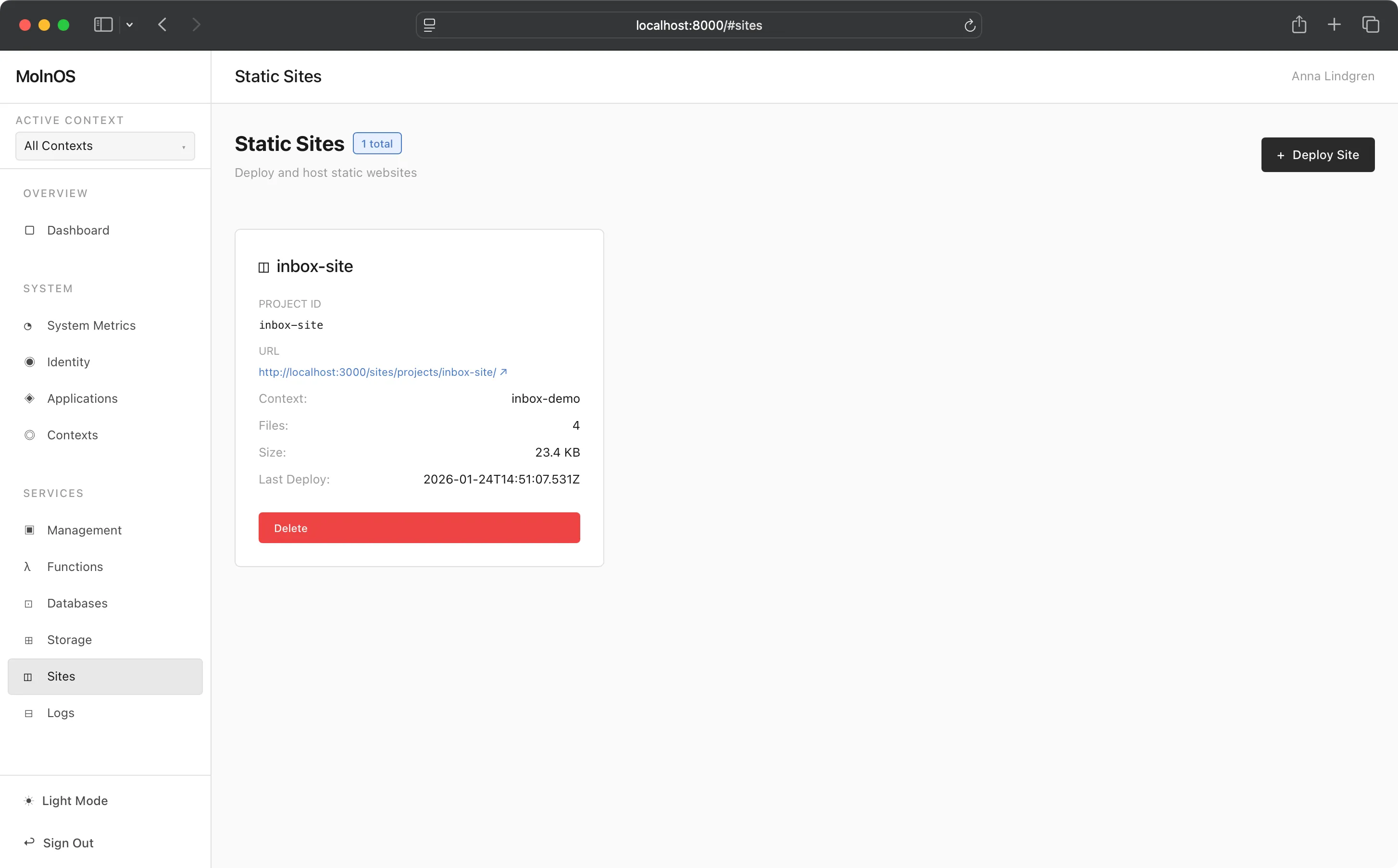
Section titled “Project Listing”View all deployed projects with metadata including project ID, name, deployment status, file count, total size, and deployment timestamps.
Common Use Cases
Section titled “Common Use Cases”- Landing Pages: Deploy marketing sites and product landing pages
- Documentation Sites: Host static documentation and user guides
- Portfolio Sites: Showcase your work with static portfolio websites
- Single-Page Applications: Deploy React, Vue, Angular, or vanilla JS apps
- Prototypes: Quickly deploy and share design prototypes
- Event Sites: Create temporary sites for events, conferences, or campaigns
- Static Blogs: Deploy JAMstack blogs and content sites
How It Works
Section titled “How It Works”Console
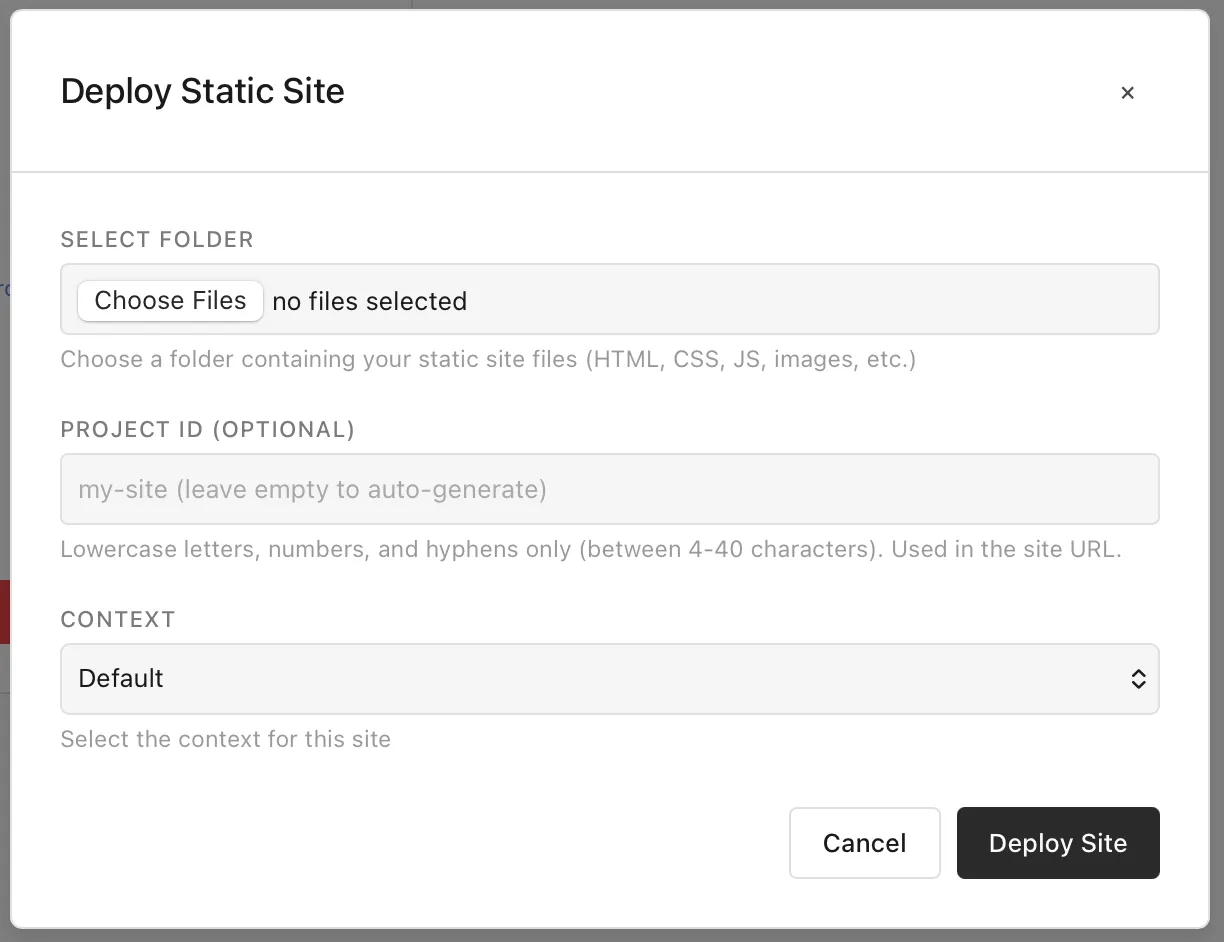
Section titled “Console”Deploying a static site is both fast and trivial. Simply click “Deploy Site”, choose your files (such as a folder) and go ahead.
Within seconds you will have a static site deployed at a randomly ID’ed path or at one ID’ed by you.
Sites are managed through the HTTP API at /sites/* endpoints.
List Sites
Section titled “List Sites”GET /sites/projectsReturns all deployed static site projects:
{ "success": true, "count": 2, "projects": [ { "projectId": "a1b2c3d4", "name": "My Static Site", "url": "http://localhost:3000/sites/projects/a1b2c3d4/", "status": "active", "files": 12, "size": "2.5 MB", "lastDeployed": "2025-12-19T13:45:00.000Z", "createdAt": "2025-12-19T10:30:00.000Z" }, { "projectId": "e5f6g7h8", "name": "Landing Page", "url": "http://localhost:3000/sites/projects/e5f6g7h8/", "status": "active", "files": 8, "size": "1.2 MB", "lastDeployed": "2025-12-20T09:15:00.000Z", "createdAt": "2025-12-20T09:15:00.000Z" } ]}Deploy Site
Section titled “Deploy Site”POST /sites/projectsDeploy a new static site by uploading files. Files must be base64-encoded:
{ "projectId": "a1b2c3d4", "files": [ { "path": "index.html", "content": "PCFET0NUWVBFIGh0bWw+CjxodG1sPgo8aGVhZD4KICA8dGl0bGU+TXkgU2l0ZTwvdGl0bGU+CjwvaGVhZD4KPGJvZHk+CiAgPGgxPkhlbGxvLCBXb3JsZCE8L2gxPgo8L2JvZHk+CjwvaHRtbD4=" }, { "path": "styles.css", "content": "Ym9keSB7CiAgZm9udC1mYW1pbHk6IEFyaWFsLCBzYW5zLXNlcmlmOwogIG1hcmdpbjogMDsKICBwYWRkaW5nOiAyMHB4Owp9" }, { "path": "script.js", "content": "Y29uc29sZS5sb2coJ0hlbGxvIGZyb20gc2NyaXB0LmpzIScpOw==" } ]}Parameters:
projectId(optional) - Custom project ID as an 8-character hexadecimal value (e.g.,a1b2c3d4). If not provided, a unique ID is auto-generatedfiles(required) - Array of file objects, each with:path- File path relative to project root (e.g.,index.html,css/styles.css)content- Base64-encoded file content
context(optional) - Context name to associate this site with for organizational grouping
Response:
{ "success": true, "projectId": "a1b2c3d4"}Delete Site
Section titled “Delete Site”DELETE /sites/projects/{projectId}Deletes a static site project and all its files:
{ "success": true, "projectId": "a1b2c3d4"}Serve Static File
Section titled “Serve Static File”GET /sites/projects/{projectId}/{filepath}Serves a static file from a deployed project. This endpoint is publicly accessible without authentication.
Parameters:
projectId- The project identifierfilepath- File path within the project (defaults toindex.htmlif not specified)
Examples:
# Serve index.html (default)GET /sites/projects/a1b2c3d4/
# Serve specific fileGET /sites/projects/a1b2c3d4/styles.css
# Serve nested fileGET /sites/projects/a1b2c3d4/assets/images/logo.png
The response content type is automatically set based on the file extension (HTML, CSS, JavaScript, images, etc.).
Site operations using the MolnOS CLI:
# List all deployed sitesmolnos sites list
# Deploy a site from JSON (reading files structure from stdin)molnos sites deploy - < site-files.json
# Deploy with custom project ID (must be 8-char hex)molnos sites deploy - --project-id=a1b2c3d4 < site-files.json
# Delete a sitemolnos sites delete <project-id>
# Delete without confirmation promptmolnos sites delete <project-id> --force
JSON Format for Deployment:
The JSON format expected by the deploy command:
{ "projectId": "a1b2c3d4", "files": [ { "path": "index.html", "content": "base64-encoded-content-here" }, { "path": "styles.css", "content": "base64-encoded-content-here" } ]}Note: The projectId field must be an 8-character hexadecimal value if provided. You can omit it if you’re using the --project-id flag, or omit it entirely for auto-generation.
Permissions
Section titled “Permissions”Site operations require appropriate permissions:
sites.project.create- Deploy new static sitessites.project.list- List all deployed projectssites.project.delete- Delete deployed sites
Note: Viewing deployed static files (accessing the public URL) does not require authentication or permissions - deployed sites are publicly accessible. Only deployment and management operations require permissions.
Deployment Best Practices
Section titled “Deployment Best Practices”Organize Files with Paths
Section titled “Organize Files with Paths”Use clear, hierarchical paths for your files:
index.htmlabout.htmlcss/styles.csscss/responsive.cssjs/main.jsjs/utils.jsassets/images/logo.pngassets/fonts/custom-font.woff2Always Include index.html
Section titled “Always Include index.html”Ensure your project includes an index.html file at the root. This file is served when accessing the project URL directly.
Base64 Encode Files
Section titled “Base64 Encode Files”All file content must be base64-encoded before deployment. Use standard base64 encoding tools:
# Linux/macOSbase64 index.html
# Node.jsnode -e "console.log(Buffer.from(require('fs').readFileSync('index.html')).toString('base64'))"
Set Correct File Paths
Section titled “Set Correct File Paths”File paths are case-sensitive and should use forward slashes (/), not backslashes:
- ✅
css/styles.css - ✅
assets/images/photo.jpg - ❌
CSS\Styles.css - ❌
assets\images\photo.jpg
Optimize Assets
Section titled “Optimize Assets”Minify and compress your assets before deployment:
- Minify HTML, CSS, and JavaScript
- Compress images to appropriate formats (WebP, optimized PNG/JPG)
- Use appropriate font formats (WOFF2 for modern browsers)
Keep Projects Focused
Section titled “Keep Projects Focused”Each project should be self-contained. Don’t mix multiple unrelated sites in a single project.
Use Valid Project IDs
Section titled “Use Valid Project IDs”Project IDs use hexadecimal characters (0-9, a-f). Auto-generated IDs are 8 characters by default:
- ✅
a1b2c3d4- Valid 8-character hex - ✅
deadbeef- Valid 8-character hex - ✅
12345678- Valid 8-character hex - ❌
my-project- Contains invalid characters (hyphens) - ❌
abc123- Too short (only 6 characters) - ❌
abcdefgh- Contains invalid hex characters (g, h)
If you don’t provide a project ID, one will be automatically generated for you.
Limitations
Section titled “Limitations”- Sites must be completely static - no server-side processing
- All files must be uploaded in a single deployment operation
- Maximum file size and total project size limits apply (check your instance configuration)
- No built-in CDN - for high-traffic sites, consider using an external CDN
- No automatic SSL/HTTPS - configure via your gateway or reverse proxy